

ONEpass Season Tickets
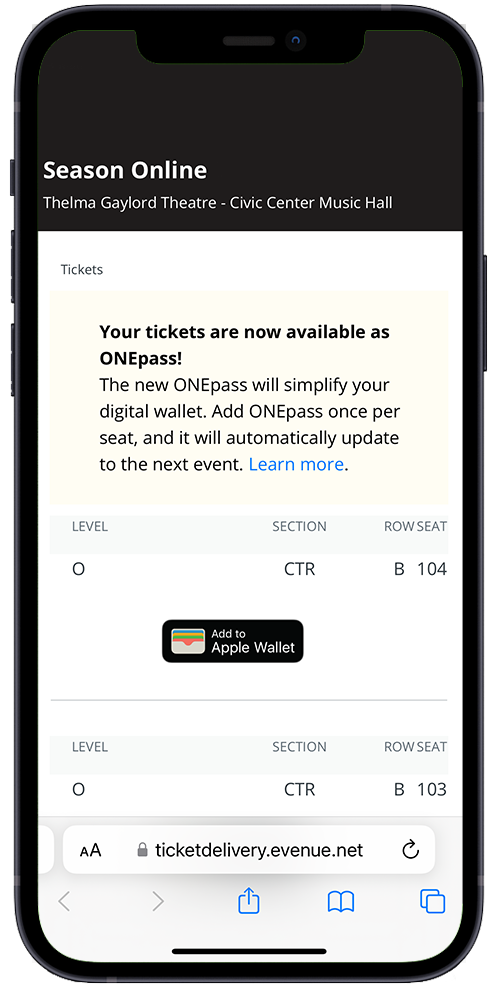 ONEpass is an all-in-1 mobile ticket that allows you to add just one mobile ticket for all performances of your season ticket package. Add ONEpass once per seat and it will automatically update to the next event.
ONEpass is available for select resident organization packages at this time.
What is ONEpass?
ONEpass is a mobile ticket that automatically updates to the next event within your season ticket package. ONEpass only needs to be added once per seat, per season.
Is ONEpass available for all tickets?
ONEpass is available for select resident arts organization season tickets. Your 'Add to Wallet' screen will indicate if ONEpass is available for your season package.
Is ONEpass required for season tickets?
No. You can opt in to ONEpass at any time, if it is available for your season ticket package.
How do I know if a ticket is a ONEpass?
When you access your ticket in your online Civic Center account, a ONEpass logo will display on the top right corner of the mobile pass.
How do I add ONEpass to my digital wallet?
Login to your online account on your mobile device. Select your available pass, tap 'Add to Wallet', and you're done!
How many times do I have to add ONEpass to my wallet?
Add each seat just once. Your ONEpass will automatically update to the next event after each performance concludes.
When does my ONEpass update to the next event?
ONEpass automatically updates overnight after a performance has concluded. If your pass has not updates, ensure that Automatic Updates are enabled for your wallet app and that location services are turned on.
How do I know if my ONEpass has been updated?
Check your ONEpass in your digital wallet to verify. After your event has concluded, it shows the next event’s date! Please note that updates usually take place overnight and may not be immediately following a performance.
My ONEpass didn't update. What do I do?
ONEpass will automatically update before each preceding event. Make sure you have automatic updates turned on (by tapping the settings in on your ONEpass) and location services turned on for your wallet app. If you do not see the update, please contact the Box Office.
You can also force a refresh by pulling down on the pass inside your digital wallet app or view your ticket status in your online account.
What happens when I exchange one of my tickets?
The ONEpass pass in your digital wallet will display “VOIDED” and you will receive a traditional single event pass.
Can I exchange an entire ONEpass?
No, but the events included in your ONEpass can be managed individually in your online account.
Can I see my season tickets individually and choose not to use ONEpass?
Individual passes will not be available if you have opted in to ONEpass.
I deleted my ONEpass. Can I add it to my digital wallet again?
Yes, login to your online account and access your passes anytime.
What if I forget my phone or my phone dies?
Visit the Box Office when you arrive for assistance.